On SikhNet and on the web, various Gurbani fonts are used to display Gurbani text on web pages. Installing these fonts give you the ability to see the Gurbani text as it is written in Gurmukhi. The Most common fonts in use are the GurbaniAkhar typefaces.
Some of the fonts are varied thickness (GurbaniThick, GurbaniThin, GurbaniAkhar, etc) so it is a good idea to install at least a few of the different fonts for optimum display.
Instructions for Windows 10 and 11 (Scroll down for Mac install)
Download the font file(s) then right-click on each font file (they end in .TTF) and choose "Install".
1. Download any/all of these fonts: GurbaniWebThick, GurbaniAkharThick, GurbaniAkhar Regular, GurbaniAkharSlim, WebAkharThick (right-click on the link and choose "Save Link As" or "Save Target As...") The font file will download to your computer. Usually it will download to your desktop, but it may be another folder. Remember where you saved the font file! It's called something like: "gurakh_s.ttf".
NOTE: WebAkharThick or GurbaniWebThick fonts are recommended if you experience spacing issues when using other fonts. There are also other Gurbani fonts that you can also install, but only the "Akhar" fonts will work for displaying the Hukamnama.
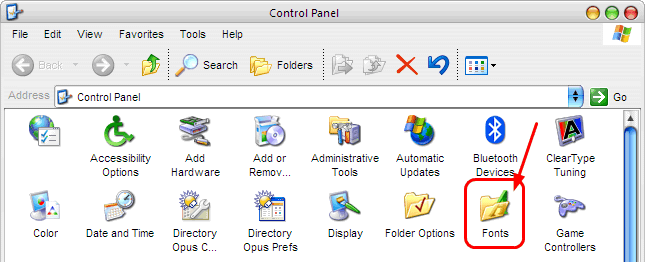
2. Open the Control Panel (Start - Control Panel) and choose the "Classic View" and then Double-click on the "Fonts" icon.
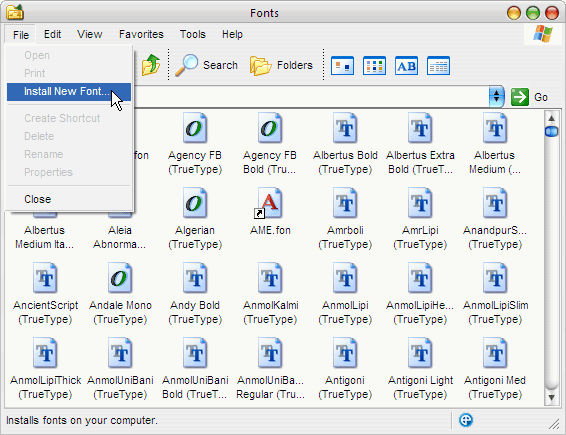
3. The Fonts Folder will Open. Click "File" and then "Install New Font"
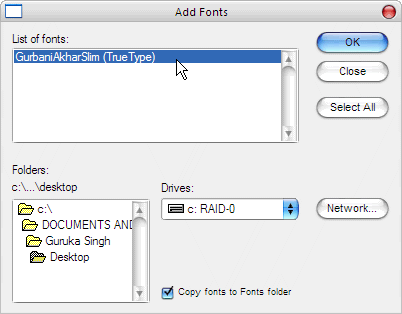
4. In the "Add Fonts" dialog box that appears, navigate the folder tree to the place you saved the font file. Select the file in the "List of fonts" box and press the "OK" button.
5. You are done! Now go to the Daily Hukamnama Web page and Refresh the page by pressing Ctrl+R on your keyboard.
Instructions for how to install Gurmukhi Fonts on a Mac:
1. Download any/all of these fonts Gurbani Akhar Thick, Gurbani Akhar Regular, Gurbani Akhar Slim. The font will automatically download to your “download” folder.
2) Open your download folder and click on the font file.
3) In the dialog box check “install font”.
Note: Other similar Gurbani fonts will also work to display the hukamnama page, so if you have other fonts installed then it will work as well. (WebAkharSlim, GurbaniAkharSlim, GurbaniWebThick, GurbaniAkhar, GurbaniAkharHeavy)